Start WhatsApp conversations instantly from Chrome without saving contacts
WhatsOpen, developed by matheus.digital, is a Chrome extension that removes the need to save phone numbers before messaging and speeds one-off outreach for business users. The extension opens WhatsApp chats directly from highlighted numbers or from dedicated buttons in Google Search and Maps, with automatic country code handling. It supports desktop WhatsApp clients and web fallback, and targets sales teams, online shoppers, and professionals who want fewer steps when contacting new people.
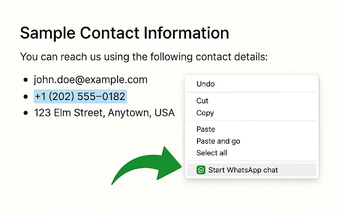
Opens chats from numbers encountered while browsing, no contact creation required
The extension adds a right-click option for highlighted phone numbers and inserts WhatsApp buttons into Google Search and Google Maps business results, letting users start chats without adding entries to their address book. Automatic country code detection ensures international numbers open correctly, and the interface includes multiple language options, such as English, Spanish, French, and German, for broad usability across markets.
Under 50KiB install size keeps browser impact minimal while switching to native clients
At under 50KiB the extension imposes a tiny install footprint, which helps avoid extra memory pressure during normal browsing. It detects the operating system and launches WhatsApp Desktop on Windows and macOS, and redirects to WhatsApp Web on Linux, so chat launches use the platform client when available. Compatibility covers Google Chrome and other Chromium-based browsers for consistent behavior on mainstream desktops.
Built for quick outreach during research, with positive user reception
Targeted at business professionals, sales teams, and online shoppers, the extension trims steps when qualifying leads or making quick inquiries during web research. User ratings remain near-perfect, with reviewers highlighting simplicity and time saved by avoiding temporary contact management. The developer positions the project as a focused browser utility rather than a contact management or CRM solution, matching users who need fast, in-browser messaging actions.
A privacy-focused, task-specific add-on suited to sales and research workflows
The developer discloses a zero data collection policy and performs operations locally on the device, which supports privacy-aware browsing habits. For smooth use, sign in to WhatsApp Desktop or Web before launching chats so windows open without interruption. WhatsOpen is a pragmatic option for business users who need immediate WhatsApp outreach during web research; its trade-off is a narrow, single-purpose scope focused on initiating conversations rather than managing contacts long-term.